
A beginner's guide to Mastodon, the open source Twitter alternative | TechCrunch
Unless if you’re really in the know about nascent platforms, you probably didn’t know what Mastodon was until Elon Musk bought Twitter and renamed it X. In the initial aftermath of the acquisition, as users fretted over what direction Twitter would take, millions of users hopped over to Mastodon, a fellow microblogging site. As time went on, users would also try out Bluesky, or Instagram’s Threads app — but because Mastodon was founded in 2016, it had years to develop its own identity as more than just an alternate Twitter.
What is Mastodon?
Mastodon was founded in 2016 by German software developer Eugen Rochko. Unlike Twitter, Facebook, Reddit or any other popular social media site, Mastodon is a nonprofit, meaning that, ideally, its goal is to benefit the public, rather than shareholders.
Mastodon might look like a Twitter clone at first glance, but the underlying system behind the microblogging platform is far more complex. The service is decentralized (no, not in a blockchain way), describing itself as a “federated network which operates in a similar way to email.”
When you first create your account, you choose a server — similar to how you choose to open an email account on Gmail, Hotmail, Yahoo or wherever — which generates your profile’s address. So, for example, if you sign up for Mastodon via the climate justice server, then your address will be @[your username]@climatejustice.social. But no matter which server you sign up with, you will be able to communicate with users from any other server, just like how Gmail users email Hotmail users and vice versa. However, some servers might have blocked other servers (perhaps if it’s an unsavory group), which would mean you can’t communicate with anyone from the blocked server.
The Mastodon lingo
Mastodon users generally refer to individual communities as “instances” or servers. These Mastodon servers can be run by individuals, groups or organizations that each have their own set of rules regarding how users can sign up, as well as their own moderation policies. Some servers let anyone join, while others are invite-only or require approval by an admin. For example, a server for professional scientists asks applicants to include a link to their research to demonstrate that they are, indeed, professionals.
Choosing which server to register your account with might seem stressful, but it’s possible to move your account later, so don’t worry. Plus, you can follow people regardless of which server they’re on.
You may also hear Mastodon described as part of the “Fediverse,” or an interconnected web of various social media services. You know how having a Twitter account doesn’t mean you can use that account on Instagram? Through the Fediverse, your single Mastodon account also grants you access to other decentralized social networks, if that interests you.
Techcrunch event
San Francisco
|
October 13-15, 2026
You may ocassionally see Mastodon’s equivalent of tweets being referred to as “toots,” but this is fading out of favor (since it’s kind of silly!). Many people are just calling them “posts” these days, but “toot” is often found referenced in older third-party clients.
Mastodon supports a number of Twitter conventions like replies, retweets, favorites, bookmarks and hashtags. For a while, Mastodon made an intentional choice not to make a quote tweet-like feature, since it can encourage dogpiling criticism, but the platform relented and rolled out that feature in 2025.
In addition, Mastodon lists work slightly differently from Twitter as you can only add people to a list if you’re already following them. And Direct messages on Mastodon are just @username posts, not private messages coming to a DM inbox — just remember to change the visibility settings if you want that message to stay between the two of you.
What does it mean that Mastodon is open source?
Anyone can download, modify and install Mastodon on their own server — plus, the developers of the platform don’t own the copyright.
That doesn’t mean that you can grab Mastodon’s code without acknowledging the source, though. Former President Donald Trump’s social media platform, Truth Social, initially launched with Mastodon code and passed it off as if it were original software. Mastodon did not take kindly to that.
How do you create a Mastodon account?
When you arrive on the Mastodon website, you can click a button called “create account,” which directs you to a page listing servers to choose from. You can filter these by various factors, like region, language, topic, sign-up speed and more. There, find a server that piques your interest and join — if it’s a server that requires you to be approved, you might need to wait a bit. From there, you can start finding people to follow, regardless of whether they’re registered via your same server.
In effort to minimize confusion on new users picking a server, Mastodon made changes amid the “Twitter exodus” so that it would easier to create an account. Now, when you go to sign up, it will give an easy option to create an account on mastodon.social instead of choosing a server.
How do you decide which Mastodon server to join?
Mastodon’s website has helpful resources — but it’s still a bit overwhelming and challenging to find a home base that aligns with your interests. Ask friends who are already on Mastodon if they have suggestions! Or just join somewhere random, because you can always change your server affiliation later once you get into the swing of things.
Can you talk to people on other Mastodon servers besides your own?
Yes, you can follow people outside of your local server and reply to their posts. However, when you want to follow someone on a different server, you have to enter their username in the search box on your server to find them first, then follow them. You can’t just go to their profile and click the follow button as you would on Twitter.
What’s the difference between the Home, Local and Federated timelines?
Your Home timeline shows you posts from people that you follow, similar to Twitter. The Local timeline shows posts from all users in your server, while the Federated timeline shows you all public posts from users that people in your server follow. (Hint: You can turn on “Slow Mode” in Preferences –> Appearance to hide timeline updates behind a click if things are coming at you too fast!)
What is Mastodon’s moderation policy?
Individual server admins set their own moderation policies, so you should read the policy on the server you choose to ensure it matches up with your values.
What are the drawbacks of Mastodon when compared with Twitter/X?
Mastodon’s user base is a fraction of a percentage of the size of Twitter’s user base. It’s also far less intuitive to navigate, since it hasn’t been designed for a massive global audience like Twitter. That could change in time as more developers join the project in the wake of the Twitter takeover.
What are the benefits of Mastodon compared with Twitter/X?
Well, for one thing, Mastodon is not owned by Elon Musk… however, it’s going to be difficult in the near-term for Mastodon to replicate the same “watercooler of the world” vibe that Twitter was defined by. Some users might prefer Mastodon to X, though, as it’s more customizable by nature. Unlike X, individual communities have different content guidelines, which provide a variety of different user experiences. And while the user base on Mastodon is smaller, this can lead to more personal and direct conversations, at times, compared with tweeting into the void, so to speak.
Is Mastodon safer than Twitter?
Mastodon is what you make of it. Due to its decentralized nature, if you are looking for a more controlled online experience, you can join a server with stricter guardrails against harassment. Some Mastodon features are also built with mitigating harassment in mind. For example, you can only search by hashtag, not by words that appear in a toot. So if you want your post to be discoverable, you can tag it — if you’d rather limit the audience, no one can find your tweet about the Red Sox by simply searching “red sox” if you haven’t tagged it.
However, a text-based search can surface the posts you’ve written, favorited, boosted or have been mentioned in, which can be useful.
Can I post images and video?
As noted above, Mastodon supports many Twitter conventions, but its support for media is more limited. Where Twitter supports a variety of media and other data appended to tweets, including its audio-only social “Spaces,” plus photos, video, GIFs, polls, precise location and experimental “Status” tags, Mastodon simply supports images, videos, audio and polls.
You can add up to four images to a postup to eight megabytes in size. Video and audio can be any length, but with a file size limit of 40 megabytes.
Can I post privately to friends?
Mastodon offers the ability to set your post’s privacy at the time of writing. Posts can be set to be public to be visible by all; unlisted to make them public but opted out of discovery features; only visible to your followers; or only visible to those users you’ve mentioned.
Can I get verified on Mastodon?
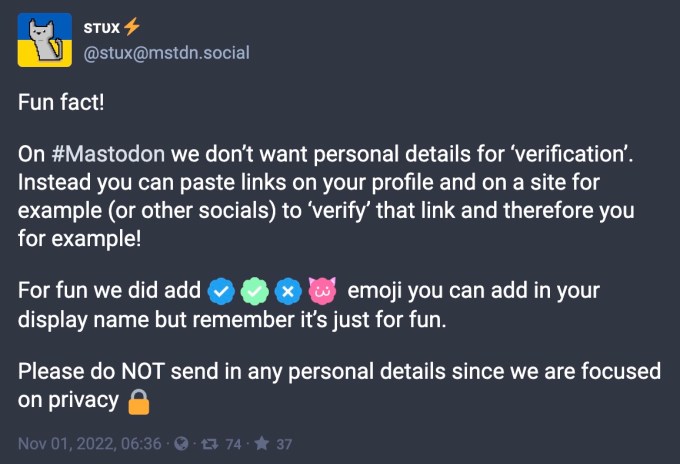
No. There’s no universal verification system like on Twitter. Some servers may vet their user sign-ups and you can self-verify, in a way, by adding links to your Mastodon profile that have a specific attribute (rel=”me”) in order to prove you are who you say you are.
Some servers are having fun with the idea of verification in a less-than-official fashion. For example, the mstdn.social server lets you add blue-and-white checkmarks and other emoji to your display name if you’d like, which make you look verified, even though these don’t mean anything. (Sort of like Twitter’s new verification system! But for free!)
Is Mastodon here to stay?
As of summer 2025, Mastodon has under one million monthly active users, and around 10 million registered users — this is to say, Mastodon is much smaller than X which had an estimated 132 million daily active users. Still, not all social networks are created equal, and you might find that you prefer tooting about TTRPGs in a dedicated server, as opposed to tweeting into a realm of madness. Or, you might find that this decentralized system is confusing, and you’ll just ride out the Muskening on X, or switch to Bluesky, Threads, or something else entirely. Choose your own adventure!
I’m not sure I want to leave X. Can I cross-post from X to Mastodon?
Yes, this is possible by way of third-party tools. These require you to authorize your account with Twitter and Mastodon and set up parameters. We’ve had success with Moa Partywhich allows you to get specific as to which tweets or retweets are cross-posted. But other tools are available, including Mastodon Twitter Crossposterwhich is also available here on GitHub.
Can I find my Twitter friends on Mastodon?
Yes, this is also possible with third-party tools. We’ve seen many Mastodon users trying out tools like Fedifinder, Twitodon and Debirdifyfor example.
Does Mastodon work with Bluesky and Threads?
It’s a no for Bluesky — not unless Bluesky chooses to adopt the ActivityPub protocol Mastodon uses. But Bluesky is not planning to integrate with ActivityPub, having decided to build its own networking protocol. There is some skepticism among the developer and open source community about whether or not Bluesky’s decision to go its own way is really about its own protocol’s advantages or if it’s more about producing a spec it could eventually control.
Threads, however, supports ActivityPub. Users on Threads can choose to share their posts with other Activity Pub servers, including Mastodon.